Transfer ownership
Make another Administrator the owner of your site. It takes effect immediately and you become an Administrator.
Who can do this: The site owner only. The new owner must already be an Administrator.
Every site has exactly one owner: the person who created it, to begin with. The owner can do everything an Administrator can, and is the only person who can hand ownership on. You might transfer it when a publication changes hands, or when someone else is taking over the running of it.
Before you start
- The new owner needs a staff account on your site with the Administrator role. If they don’t have one, invite them as an Administrator and wait until they’ve accepted.
- Suspended staff can’t become owner. Un-suspend them first.
Transfer ownership
- Go to Settings → General → Staff and open the Administrators tab.
- Select the person who will become the owner.
- Select the … button at the top right of their profile, then Make owner.
- Read the warning and select Yep — I’m sure.
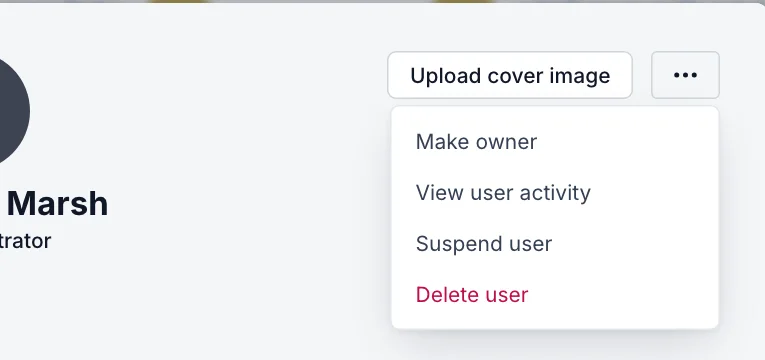
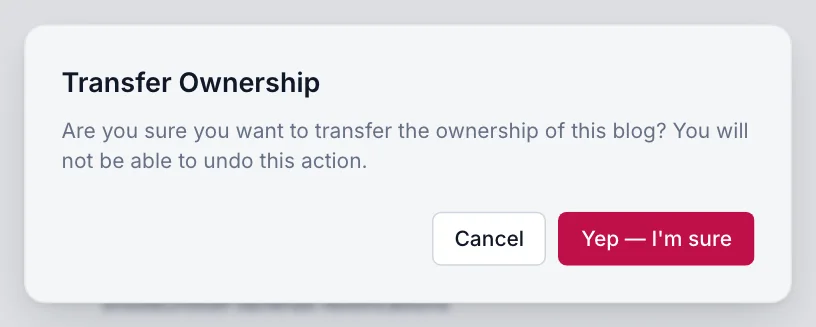
That’s it. The change is immediate: there’s no email to confirm. The new owner appears at the top of the staff list, and you stay on as an Administrator.
What changes, and what doesn’t
| Changes | Stays the same |
|---|---|
| The new owner can transfer ownership again, and can’t be suspended or deleted by Administrators | Your posts, pages, members, newsletters and settings |
| You become an Administrator, with full access to content and settings | Your byline on everything you’ve written |
| Only the new owner can remove you | Your Blogaly account, plan and billing in the dashboard |
Good to know
- You can’t undo a transfer yourself. Only the new owner can make you owner again.
- If you’re leaving the publication completely, transfer ownership first, then ask the new owner to remove your staff account.
- Administrators who aren’t the owner don’t see Make owner at all.
Last checked against the product on 7 November 2026.
Related
Still stuck?
Tell us what you were trying to do and what you saw, and we’ll help you sort it out.
Contact us