Offers and discounts
Create a discount or a free trial behind a shareable link to win new subscribers, and a retention offer to keep members who are about to cancel.
Who can do this: The site owner or an administrator, with Stripe connected and at least one active paid tier.
Offers come in two kinds:
- Signup offers live behind their own link, such as
your-name.blogaly.uk/harbour-days. Readers who open it see the offer in your site’s pop-up and go straight to checkout. Use them for launches, seasonal sales or a deal for one audience. - Retention offers appear automatically when a paying member starts to cancel, with one last offer to stay. There’s one for monthly plans and one for yearly plans.
Find them under Settings → Growth → Offers. You’ll only see this section once Stripe is connected, and you need at least one active paid tier to create a signup offer.
1. Open your offers
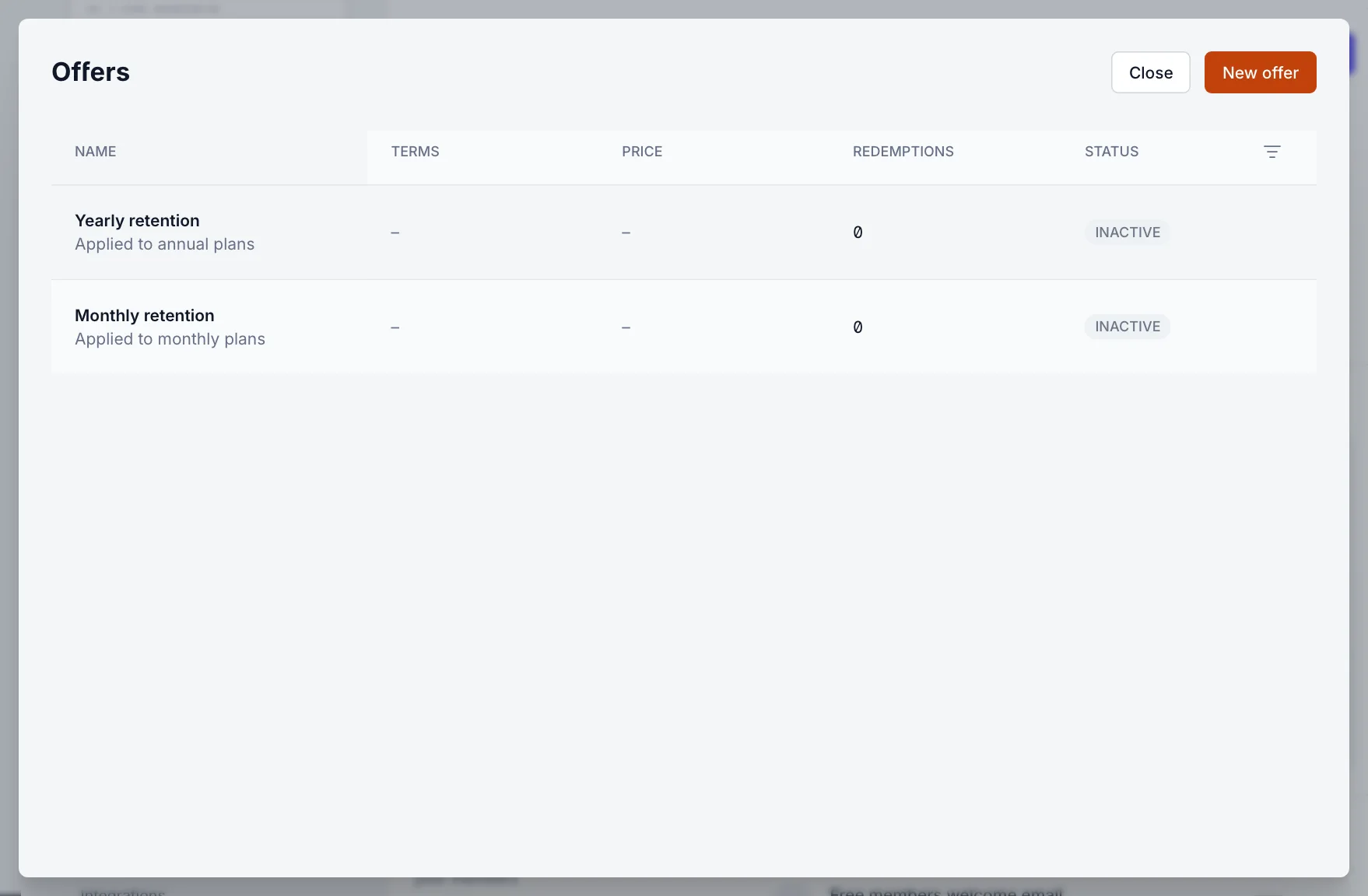
Select Manage offers. The list shows each offer’s terms, price, number of redemptions and status. The two retention offers are always listed, marked Inactive until you turn them on. Use the filter icon to sort, or to show archived offers.
2. Create a signup offer
- Select New offer.
- Under General, enter an Offer name (up to 40 characters). Readers see it on Stripe’s checkout page, so keep it plain, such as “Harbour Days”.
- Enter a Display title and Display description. These are the headline and the text in your site’s pop-up.
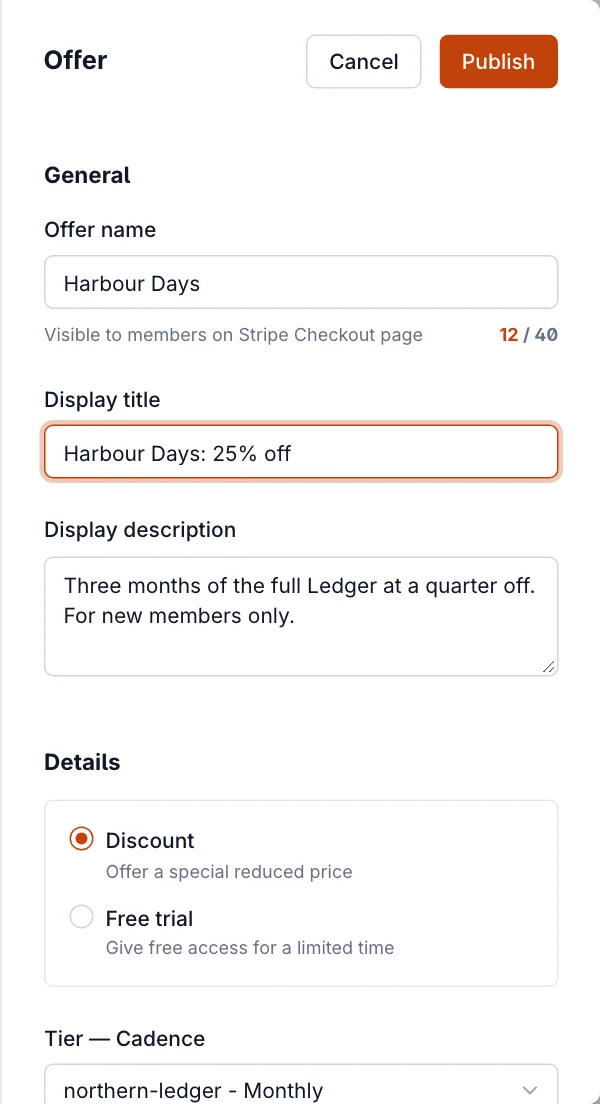
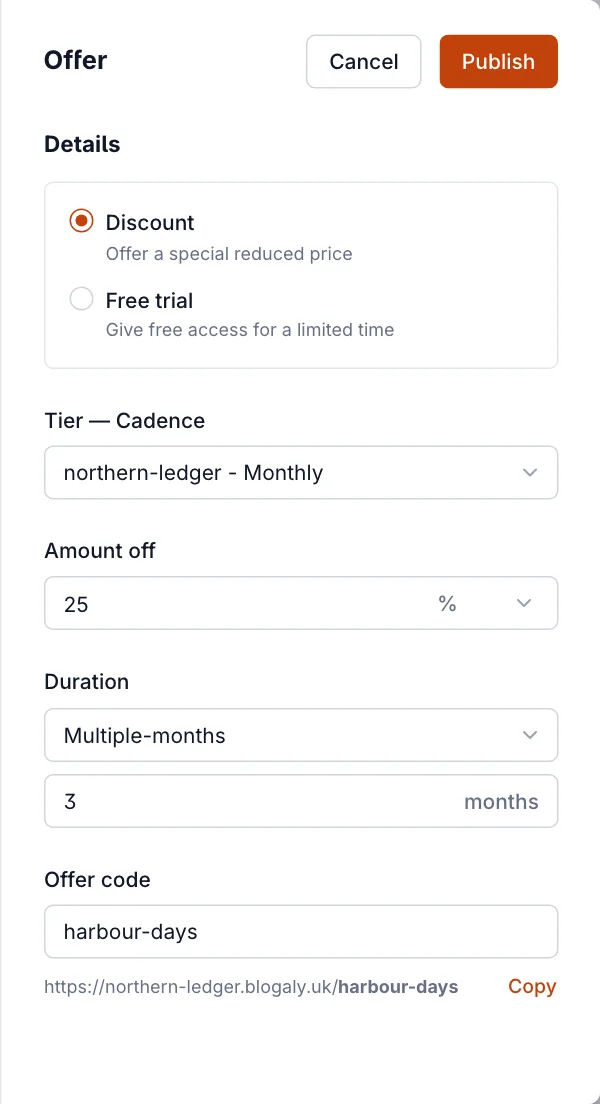
- Under Details, choose Discount (a lower price) or Free trial (free days first, see free trials).
- Choose the tier and billing period under Tier — Cadence. An offer is for one tier and either its monthly or its yearly price.
- For a discount, enter the Amount off and choose % or a fixed amount in the tier’s currency.
- Choose the Duration: First-payment (only the first charge), Multiple-months (enter how many; monthly prices only) or Forever.
- Check the Offer code. It’s filled in from the name and becomes the end of the offer link, shown underneath with a Copy button.
- Select Publish.
After publishing you’ll see Your new offer is live! with the link to copy and buttons to share it on X, Facebook and LinkedIn. Put the link in a newsletter, a post, a button or your site navigation.
What readers see
- Opening the link shows your site with the offer in the pop-up: your display title and description, the discount (for example 25% off) or days free, and the tier with its new price.
- New readers enter their email (and name, if you ask for it) and continue to Stripe’s checkout, which shows the offer name and the reduced price.
- Signed-in free members go straight to checkout.
- Members who already pay can’t take a signup offer: checkout is refused for anyone with an active paid subscription.
3. Set up a retention offer
- In the offers list, select Monthly retention or Yearly retention.
- Turn on Enable monthly retention (or yearly).
- Write a Display title and Display description, or leave them empty to use the standard wording: “Before you go” and “We’d hate to see you leave. How about a special offer to stay?”
- Choose Percentage discount (with an amount and duration) or Free month(s) (with how many).
- Check the preview on the left, then select Save.
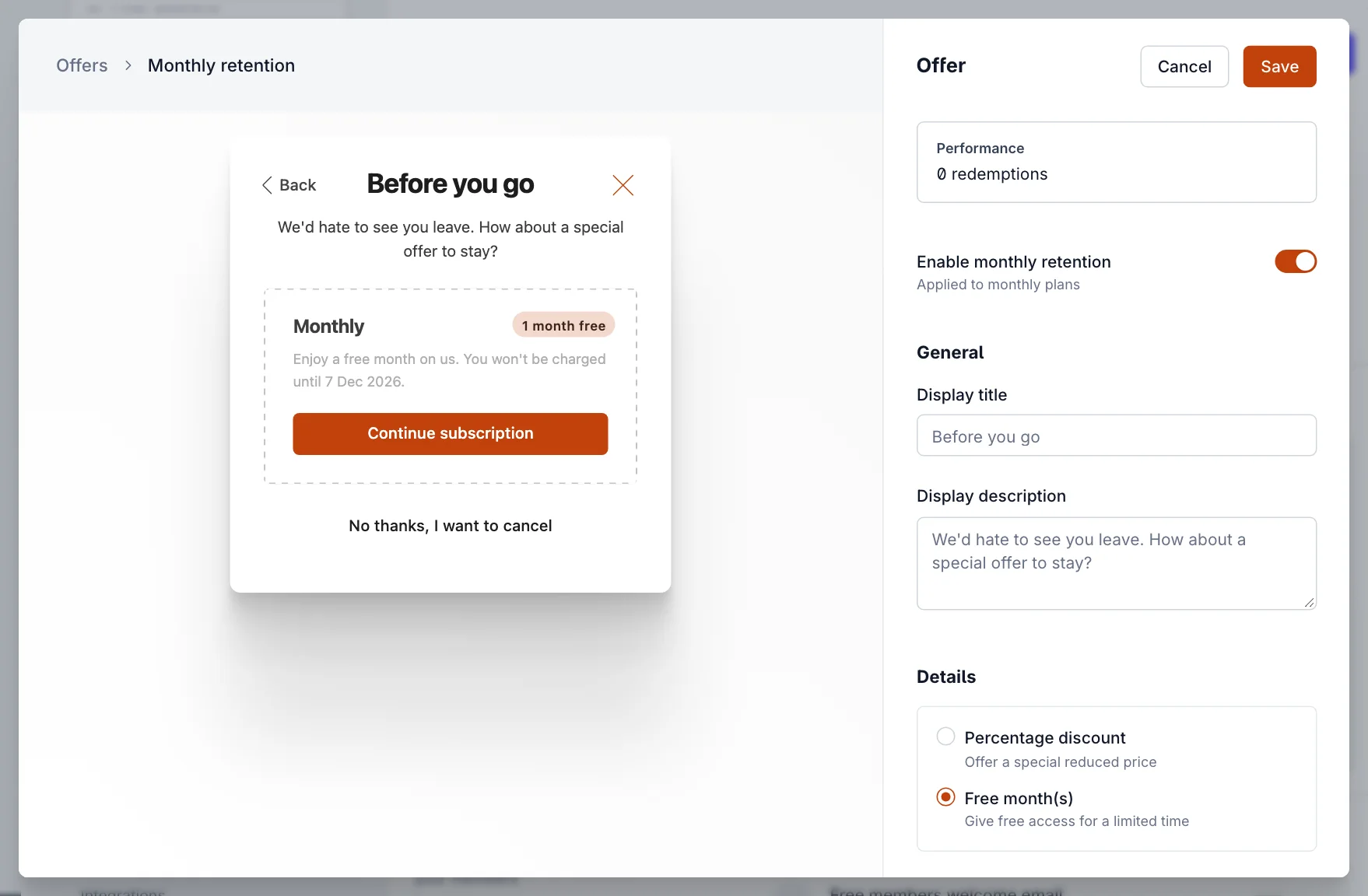
A member who accepts keeps their subscription with the discount or free time applied. One who selects No thanks, I want to cancel carries on cancelling as usual. The Performance box counts redemptions, with a link to see those members.
Change or end an offer
- Open an offer from the list to change its Offer name, Offer code, Display title or Display description. The terms (type, tier, amount, duration) can’t change once published. Archive it and create a new one instead.
- Changing the code changes the link. Old links stop working.
- Select Archive offer to stop new redemptions. Members who already redeemed keep their discount for its duration. Reactivate offer brings it back.
- Archiving a tier also disables its offers.
Common mistakes
- “You must have an active tier to create an offer.” Every paid tier is archived. Reactivate one, or add one, in Tiers.
- Choosing Forever by accident. A forever discount stays for the life of the subscription.
- Sharing the offer with existing paid members. It’s for new subscribers; use a retention offer for people already paying.
- Expecting a monthly offer to work on the yearly price. Make one offer per billing period.
Good to know
- A discount offer doesn’t include the tier’s free trial.
- To see who used an offer, filter the list in Members by offer.
- Retention offers only reach members who cancel from your site’s account pop-up, not cancellations you make in Stripe or in Members.
Last checked against the product on 7 November 2026.
Related
Still stuck?
Tell us what you were trying to do and what you saw, and we’ll help you sort it out.
Contact us