Your analytics, and why there’s no cookie banner
What each number on the Analytics page means, where it comes from, and how Blogaly counts visitors without cookies.
Who can do this: Owners and Administrators, on every plan. Analytics are on for every site.
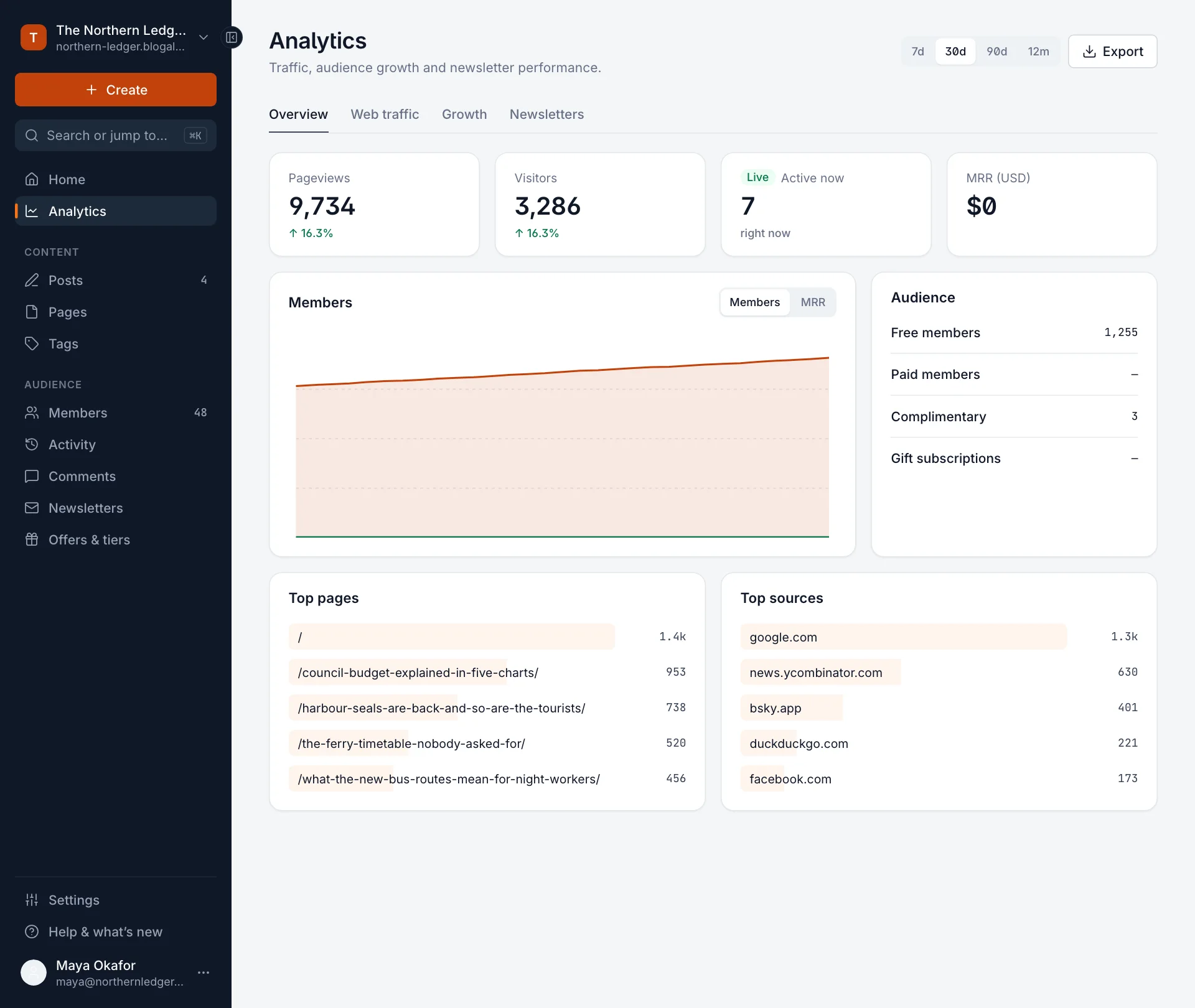
Every Blogaly site has analytics built in. There’s nothing to install or switch on: as soon as your site is live, visits are counted. Select Analytics in the sidebar of your site’s admin to see them.
Where the numbers come from
The Analytics page brings together three kinds of information. Knowing which is which explains most of the differences you’ll notice between them.
| Source | What it counts | Shown as |
|---|---|---|
| Web visits | People reading your public website, counted by Blogaly’s own cookie-free visitor counter | Pageviews, Visitors, Visits, Active now, Top pages, Top sources |
| Members | Your site’s own member records: who signed up, who pays, and when | Members chart, Audience, Growth tab, MRR |
| Each newsletter you send: how many it went to, how many opened it and clicked a link | Newsletters tab, and the email figures for each post |
Someone who reads your newsletter only in their inbox shows up in email numbers, not web visits. A visitor who never signs up shows up in web visits, not members.
The four tabs
| Tab | What’s on it |
|---|---|
| Overview | The headline numbers from all three sources on one page. |
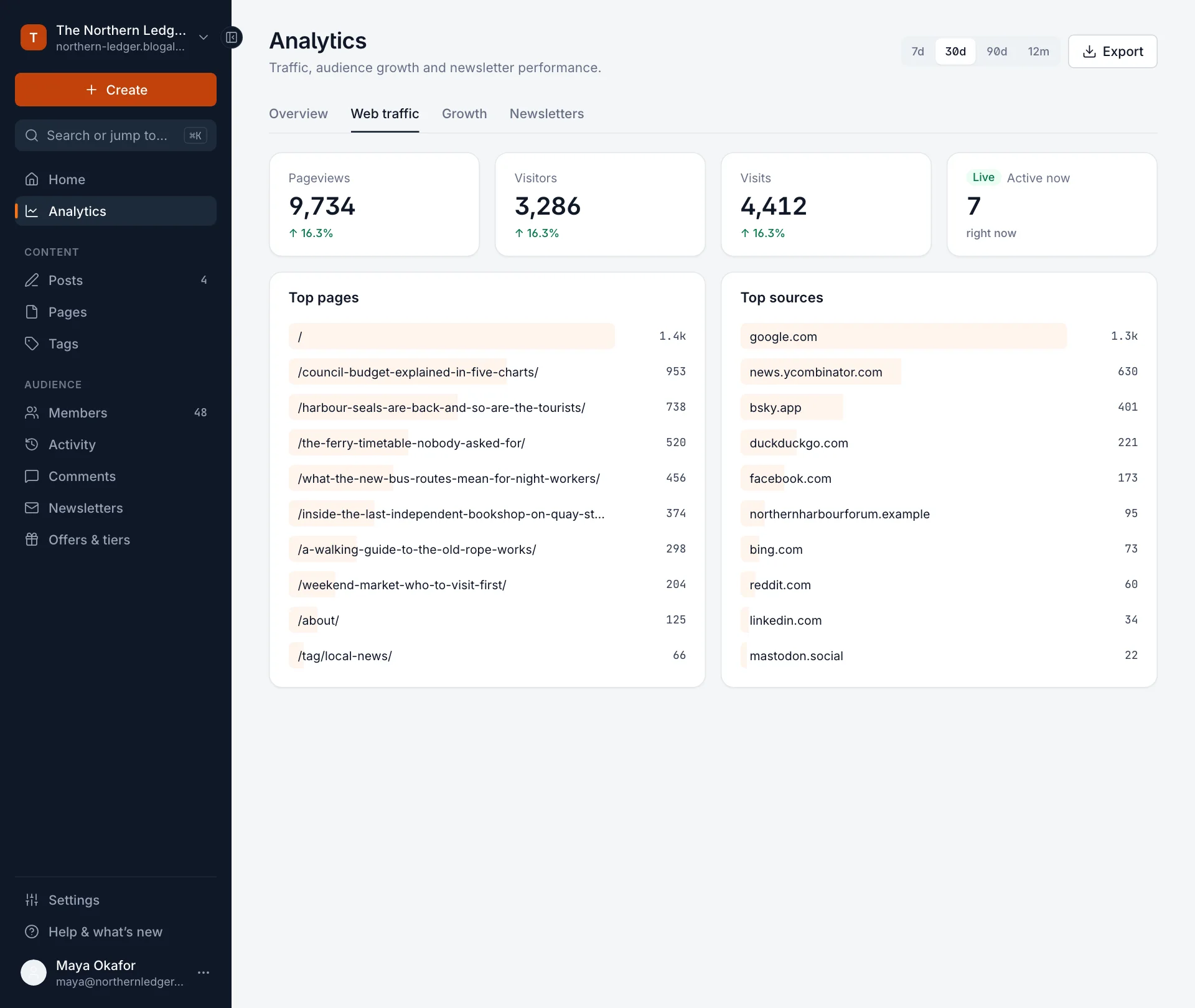
| Web traffic | Pageviews, visitors and visits, with the top 10 pages and sources. |
| Growth | Members over time, free and paid, and revenue. See where your members come from. |
| Newsletters | Subscribers, sends, open and click rates. See opens, clicks and email growth. |
What each number means
| Number | Meaning |
|---|---|
| Pageviews | Every time a page of your site is loaded. One person reading three posts is three pageviews. |
| Visitors | Different people who visited in the period, as best we can tell without cookies (see below). |
| Visits | Separate sittings. Someone who reads in the morning and comes back in the evening is one visitor and two visits. |
| Active now | People on your site in the last few minutes. It refreshes every minute while the page is open. |
| MRR | Monthly recurring revenue: what your paid subscriptions bring in each month, in your main currency. It stays at zero until you take payments. |
| Top pages | Your most-viewed pages, by address. / is your homepage. |
| Top sources | The websites that sent people to you: search engines, social networks, other blogs. People who type your address, use a bookmark or click a link in an email app often aren’t listed, because their browser doesn’t say where they came from. |
The small arrow under a number compares it with the period just before. On 30d, for example, it compares the last 30 days with the 30 days before that.
Change the period, or export

- Choose 7d, 30d, 90d or 12m. Each period ends today and includes today, counted in your site’s time zone (set in Settings › Timezone).
- Your choice applies to every tab until you change it.
- Export downloads the tab you’re looking at as a CSV file you can open in a spreadsheet.
No cookies, and what that means
Blogaly counts visits with a small script that loads on your public pages. It doesn’t set cookies, doesn’t store anything on your readers’ devices, and doesn’t build profiles of people or follow them to other sites. Visit data stays with Blogaly and isn’t shared with advertisers.
Because of that, your analytics don’t need a cookie banner. If you add other services to your site, for example with code injection, check whether those use cookies: they might need one.
The trade-off is that visitor counts are estimates. Without a cookie we can’t recognise the same person across devices or over long periods, so someone who reads on their phone and their laptop counts as two visitors.
Good to know
- Some ad and tracker blockers stop all counting scripts, including ours. Your real readership is usually a little higher than the web numbers show.
- Your own visits to your site count too. Your time in your site’s admin doesn’t.
- The longest period you can view at once is 12 months.
- Members and email numbers come from your own records, so they’re exact. Only web numbers are estimates.
- Only Owners and Administrators see Analytics.
Last checked against the product on 7 November 2026.
Related
Still stuck?
Tell us what you were trying to do and what you saw, and we’ll help you sort it out.
Contact us