Export your content, members and images
Download your posts, settings, members, analytics, theme, redirects and images, for a backup or to move elsewhere.
Who can do this: Administrators and the site owner.
Your writing and your readers are yours. Everything on your site can be downloaded in open formats, at any time, on every plan. Exports are a good habit before big changes, and essential before you cancel your plan.
| What | Where | Format |
|---|---|---|
| Posts, pages, tags, staff, tiers, newsletters, settings | Settings → Advanced → Migration tools → Export → Content & settings | JSON |
| Post performance (views, sends, opens, clicks, signups) | Migration tools → Export → Post analytics | CSV |
| Members and their subscriptions | Members → Export | CSV |
| Your theme, including any code edits | Settings → Site → Theme → … → Download | ZIP |
| Redirects and routes | Settings → Advanced → Labs | YAML |
| Images, video and files | Contact us | ZIP |
Content and settings
- Go to Settings → Advanced → Migration tools and open the Export tab.
- Select Content & settings. A
.jsonfile downloads straight away. - Select Post analytics for a spreadsheet of how each post performed (up to your 1,000 most recent posts).

The JSON file holds your posts and pages (as written, including drafts and scheduled posts), tags, staff profiles, tiers, offers, newsletters, snippets and settings. It’s the file Universal import reads, so it’s also how you copy a publication into another site.
Members
- Go to Members in the sidebar.
- To export everyone, make sure no filter or search is active. To export a group, filter the list first, for example by label or by paid status.
- Select Export. A CSV file downloads with each member’s email, name, labels, newsletter choices and subscription status.

The same CSV format works with import members, and most email tools accept it too.
Your theme
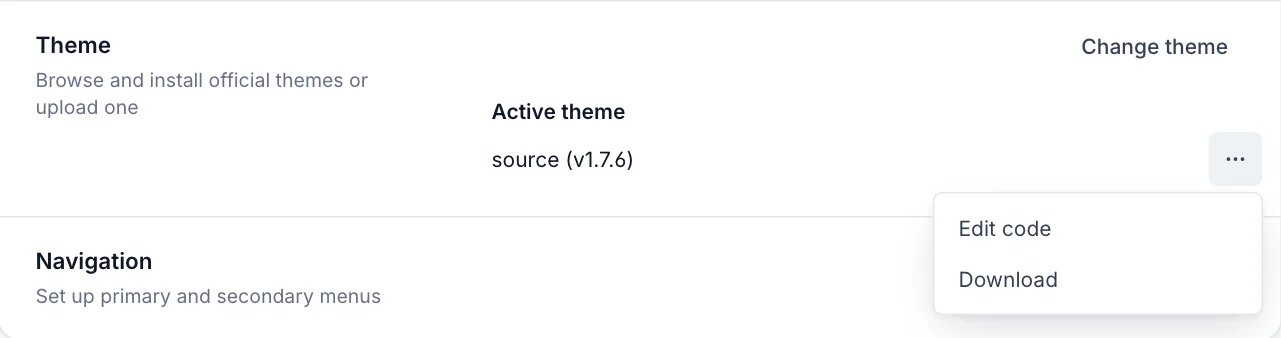
Go to Settings → Site → Theme, open the … menu next to your active theme, and select Download. You get a ZIP of the theme exactly as it runs on your site, including changes made with Edit code.
Redirects and routes
In Settings → Advanced → Labs, select Open, then Download current redirects and Download current routes. Keep these with your content export if you’ve customised either. See redirects and routes.
Images and other files
Images in your content export are links to your Blogaly site, so they keep working while your site is live. Your admin can’t download all your uploaded images, video and files in one go yet. If you need a copy of them, for a backup or a move, contact us from the email address on your account and we’ll help.
Good to know
- Only Administrators and the owner can export content and settings. Exports can contain personal data about your members, so store them somewhere safe.
- Paid members’ payment details stay in your Stripe account; the CSV only records their status. You keep full access to Stripe whatever happens to your site.
- Export again after big changes. A file only holds what was on your site when you downloaded it.
- If your site is paused, your data is kept. Restart your subscription to get back in and export; see why a site is paused.
Last checked against the product on 7 November 2026.
Related
Still stuck?
Tell us what you were trying to do and what you saw, and we’ll help you sort it out.
Contact us