Free trials
Let readers try a paid tier free for a set number of days before their first payment, on every signup or through an offer link.
Who can do this: The site owner or an administrator, with Stripe connected (Publisher or Business plan).
A free trial gives a new member full access to a paid tier for a number of days. They enter their card at Stripe’s checkout when they start, aren’t charged during the trial, and are billed the full price on the day it ends unless they cancel first.
| Kind of trial | Who gets it | Set it up in |
|---|---|---|
| On a tier | Everyone who signs up to that tier through your sign-up pop-up | Settings → Membership → Tiers |
| As an offer | Only readers who use the offer’s link, for example from a campaign | Settings → Growth → Offers |
Add a trial to a tier
- Open Settings → Membership → Tiers and select the paid tier.
- Turn on Add a free trial. It starts at 7 days.
- Enter the number of days you want, for example
14. - Check the Tier preview: it now shows a 14 days free label. Select Save.
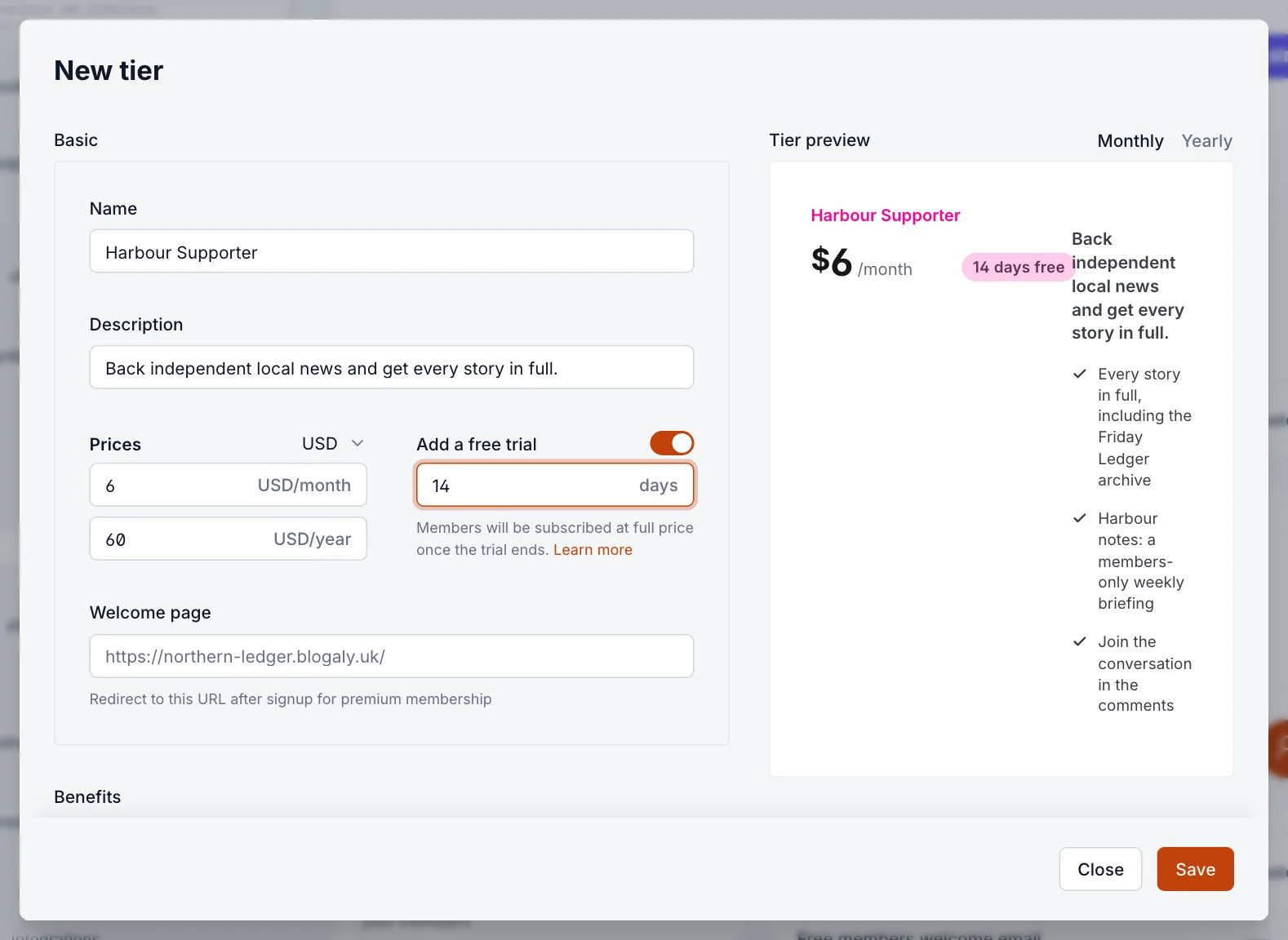
To end trials on a tier, turn Add a free trial off and save. Members already in a trial keep it.
Offer a trial with a link
A trial offer is useful when you want a longer or shorter trial for one audience: a podcast listener deal, say, or a partner newsletter. Readers who arrive through the link get the offer’s trial instead of the tier’s.
- Open Settings → Growth → Offers, select Manage offers, then New offer.
- Fill in Offer name, Display title and Display description.
- Under Details, choose Free trial.
- Pick the tier and cadence under Tier — Cadence (for example monthly).
- Enter the Trial duration in days.
- Set the Offer code. It becomes the end of the link, such as
your-name.blogaly.uk/try-free. - Select Publish, then share the link.
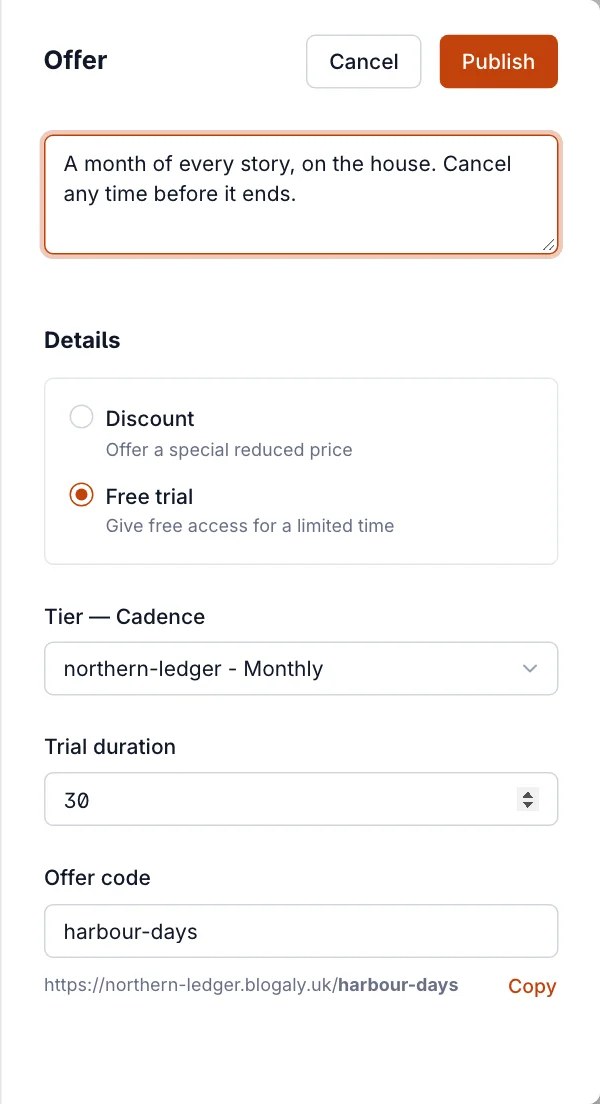
More on links, sharing and tracking in offers and discounts.
What readers see
- In the sign-up pop-up, the tier shows its days free label.
- On an offer link, the pop-up shows Try free for 30 days, then the normal price, and a Start 30-day free trial button.
- At Stripe’s checkout they enter their card and see that nothing is due today and when the first payment will be.
- In their account, the plan shows Free Trial – Ends with the date.
When a trial ends
- If the member does nothing, Stripe charges the full price on the end date and the subscription continues as normal.
- If they cancel during the trial (in their account, from your site’s pop-up), they keep access until the trial ends and are never charged.
- In Members, a member in a trial shows Free trial on their subscription.
Good to know
- A discount offer never comes with the tier’s trial. Readers get the discount or the trial, not both.
- A trial offer replaces the tier’s trial for those readers: a 30-day offer on a tier with a 7-day trial gives 30 days.
- Trials are for new paid subscriptions. An existing paid member can’t start a second subscription to get another trial.
- Readers need a card even for a trial. That’s how Stripe can bill them when it ends.
- Stripe can email readers before their trial ends. Turn that on in your Stripe dashboard’s billing settings.
Last checked against the product on 7 November 2026.
Related
Still stuck?
Tell us what you were trying to do and what you saw, and we’ll help you sort it out.
Contact us